
MCP on Azure: Build and Run Your Own Model-Context Server (Blob + Image Captioning)
GitHub Repo: github.com/OfekBenEliezer/mcp-on-azure
Video: What is MCP? (YouTube, Captain Azure)
This guide shows exactly how to run a minimal MCP Server on Azure: list files from Azure Blob Storage and describe an image using Azure OpenAI (gpt-4o vision). It’s the same flow we built live - no fluff, just what works.
What is MCP (Model Context Protocol)?
MCP is an open spec that lets AI clients (e.g., GitHub Copilot, Claude) call secure, predefined “tools” over a simple JSON protocol. An MCP Server exposes those tools—each with a name, schema, and logic—so your AI can safely interact with your data and services (RBAC, logging, guardrails).
Architecture (what we built)
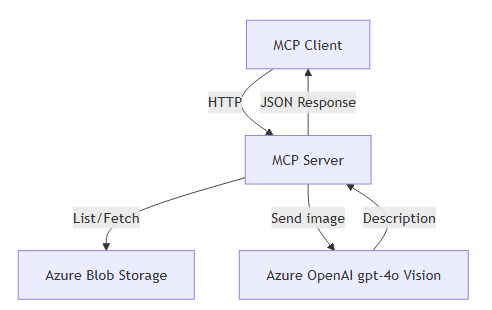
A (MCP Client)  →  B (MCP Server, Express/Node)
B → Azure Blob Storage (list files, fetch blob URL)
B → Azure OpenAI gpt-4o vision (describe the image)
B → returns JSON back to A
Prerequisites
- Node.js 18+ (or 20/22) and Git
- Azure Storage Account with a container containing images (PNG/JPG)
- Azure OpenAI resource with a deployment of
gpt-4o - Windows PowerShell (or bash) for test commands
Get the Code
# clone
git clone https://github.com/OfekBenEliezer/mcp-on-azure.git
cd mcp-on-azure

# install dependencies
npm install
Environment Settings (.env)
Create a .env file at the repo root (the same folder you run commands from).
These are the exact variables the server expects. Note the trailing slash on the OpenAI endpoint.
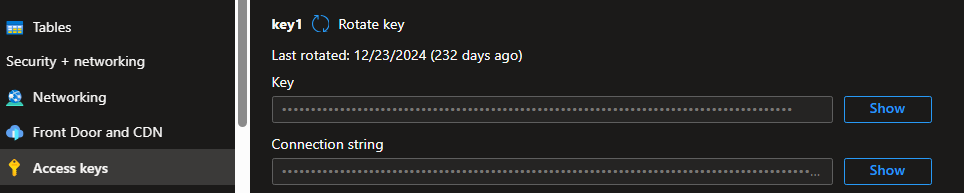
Connection string.
AZURE_STORAGE_CONNECTION_STRING=DefaultEndpointsProtocol=https;AccountName=<your-account>;<...>;EndpointSuffix=core.windows.net
AZURE_OPENAI_ENDPOINT=https://<your-openai>.openai.azure.com/
AZURE_OPENAI_KEY=<your-azure-openai-key>
AZURE_OPENAI_DEPLOYMENT_NAME=gpt-4o
AZURE_OPENAI_API_VERSION=2024-02-15-preview
Container name: The server uses captain-azure by default.
If your container is different, edit the containerName constant inside
mcp-ts-server/server.js.
Security tip: Don’t commit .env. Keep only .env.example in the repo.
Run the MCP Server (local)
node .\mcp-ts-server\server.js
# Expected log: MCP Server running on http://localhost:3333
Tools exposed by the server
POST /tools/list_captain_files→ returns all blob names in the containerPOST /tools/describe_blob→ returns a short description for a given image blob
Test (PowerShell / curl)
List files
Invoke-RestMethod -Uri "http://localhost:3333/tools/list_captain_files" `
  -Method Post `
  -ContentType "application/json"
Describe an image
Invoke-RestMethod -Uri "http://localhost:3333/tools/describe_blob" `
  -Method Post `
  -Body (@{ blobName = "CertWebinar.png" } | ConvertTo-Json) `
  -ContentType "application/json"
curl versions:
curl -s -X POST http://localhost:3333/tools/list_captain_files \
  -H "Content-Type: application/json"

curl -s -X POST http://localhost:3333/tools/describe_blob \
  -H "Content-Type: application/json" \
  -d '{"blobName":"CertWebinar.png"}'
What the server does (brief)
- list_captain_files: uses
@azure/storage-blobto iterate blobs and return names. - describe_blob: builds a Azure OpenAI vision request to
/openai/deployments/<DEPLOYMENT>/chat/completions?api-version=<VERSION>with the blob URL asimage_url, and returns a one-sentence description.
Troubleshooting (real fixes we used)
- MODULE_NOT_FOUND: server.js — run from repo root with
node .\mcp-ts-server\server.js, or add"start": "node mcp-ts-server/server.js"topackage.jsonand runnpm start. - TypeError: startsWith / ERR_INVALID_URL — your
AZURE_STORAGE_CONNECTION_STRINGis missing or malformed. Copy the full “Connection string” from Storage Account → Access keys and paste into.env. - 401 Incorrect API key — ensure you’re using Azure OpenAI key + endpoint (not public OpenAI).
Endpoint must end with a trailing slash, e.g.
https://<res>.openai.azure.com/. - 404 from OpenAI — check the composed endpoint path:
/openai/deployments/<DEPLOYMENT>/chat/completions?api-version=<VERSION>and thatAZURE_OPENAI_DEPLOYMENT_NAMEmatches your deployed model (e.g.,gpt-4o). - Blob not found / wrong extension — use the exact blob name returned by
list_captain_files(e.g.,.pngvs.jpg). - GitHub push blocked (secret scanning) — don’t commit
.env. If it slipped in, regenerate keys in Azure, add.envto.gitignore, and clean history:Quickest clean (re-init history)
rmdir .git /s /q              # PowerShell (Windows)  |  rm -rf .git (macOS/Linux)
git init
git add .
git commit -m "Initial clean commit (no secrets)"
git branch -M main
git remote add origin https://github.com/OfekBenEliezer/mcp-on-azure.git
git push -u --force origin main
Deploy (optional, later)
In the repo we ran locally. To deploy, containerize and push to Azure Container Apps or Web App for Containers. Make sure you pass the same env vars in Azure (never commit secrets).
✨ Credits
Built and documented by 🚀 Captain Azure — Ofek Ben Eliezer
📂 Repo: mcp-on-azure
🎥 Video: What is MCP?
💡 Why this matters:
MCP gives your copilots a safe, consistent way to talk to Azure.
With a tiny Node.js server, you can bridge Azure Blob Storage and Azure OpenAI — fast.
Start small, and extend with more tools whenever you’re ready.