
Azure Entra Security Blueprint
Identity is the security foundation of every modern cloud environment. When working with Microsoft Entra, the goal is not only to authenticate users, but to build an identity layer that is protected, predictable, and ready for scale. Strong identity architecture is what separates environments that withstand real world incidents from those that collapse under pressure.
Identity is the new control plane. When it is architected correctly, every other security layer becomes stronger.
After working with organizations across different industries, as well as thousands of students and engineering teams, I’ve developed a clear and practical approach to designing Entra based environments. In this article I will walk you through the same blueprint I use in real world projects to help organizations understand their risks, enforce policy, and automate identity protection at scale.
Let’s break the blueprint down step by step.
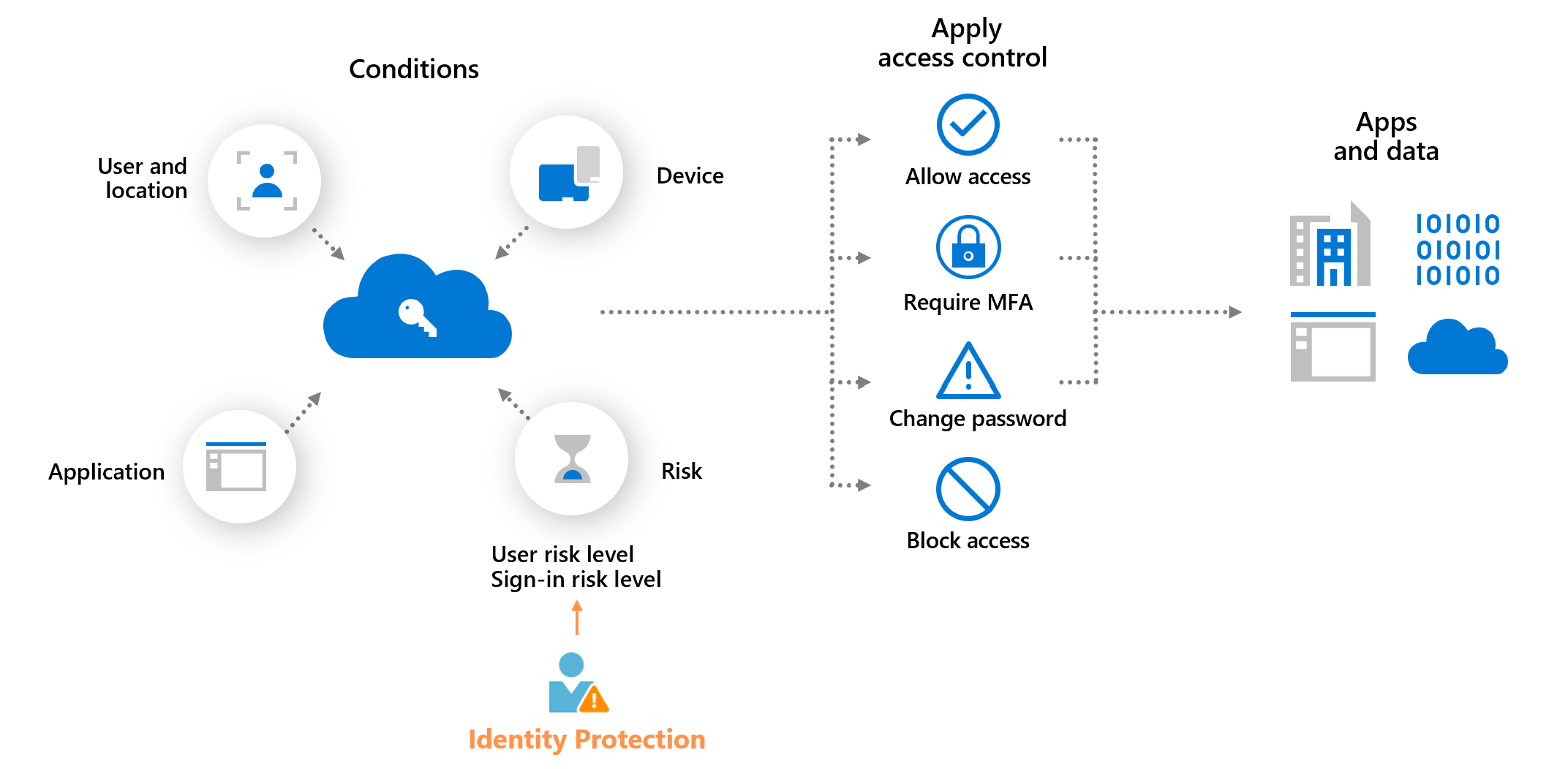
Table of Contents
- Identity is the First Control Plane
- Understand the Entra Security Signal Engine
- How Entra Detects and Evaluates Risk
- From Risk to Policy: Conditional Access
- Identity Governance and Lifecycle Control
- Integrate with Defender and Sentinel
- The Complete Entra Security Blueprint
- Final Thoughts
1. Identity is the First Control Plane
Every cloud environment begins with identity. Before deploying networks, virtual machines, or applications, the most important architectural decision is how your identity layer in Microsoft Entra is designed. This is where access is granted, evaluated, monitored, and controlled. If this layer is weak, the entire cloud architecture becomes vulnerable.
Modern attackers no longer focus on breaching firewalls or network boundaries. They target credentials, sessions, tokens, and misconfigured permissions. This shift is exactly why the principle of Identity is the new security perimeter has become central to cloud security architecture. Entra provides a full identity security stack that includes Identity Protection, Conditional Access, continuous risk evaluation, and real time monitoring.
Instead of manually building policies from scratch, start with Microsoft’s proven identity architectures:
These reference architectures include recommended Conditional Access baselines, risk evaluation flows, governance patterns, and threat models. They provide a solid foundation for building identity that aligns with Microsoft’s field experience and real world attack scenarios.
When defining your identity foundation, focus on:
- A clear identity baseline with MFA, passwordless, and strong sign in protections
- Risk evaluation flows for users, sign ins, and applications
- Conditional Access policies aligned with Zero Trust and least privilege principles
- Governance and lifecycle management using PIM, access reviews, and entitlement management
- Security monitoring with Defender for Cloud Apps, Entra Audit Logs, and integration with Sentinel
By building your environment on Microsoft’s identity blueprints and adapting them to your organizational needs, you start with a secure structure from day one. You are not experimenting. You are relying on best practices that have already protected thousands of environments worldwide.
2. Understand the Entra Security Signal Engine
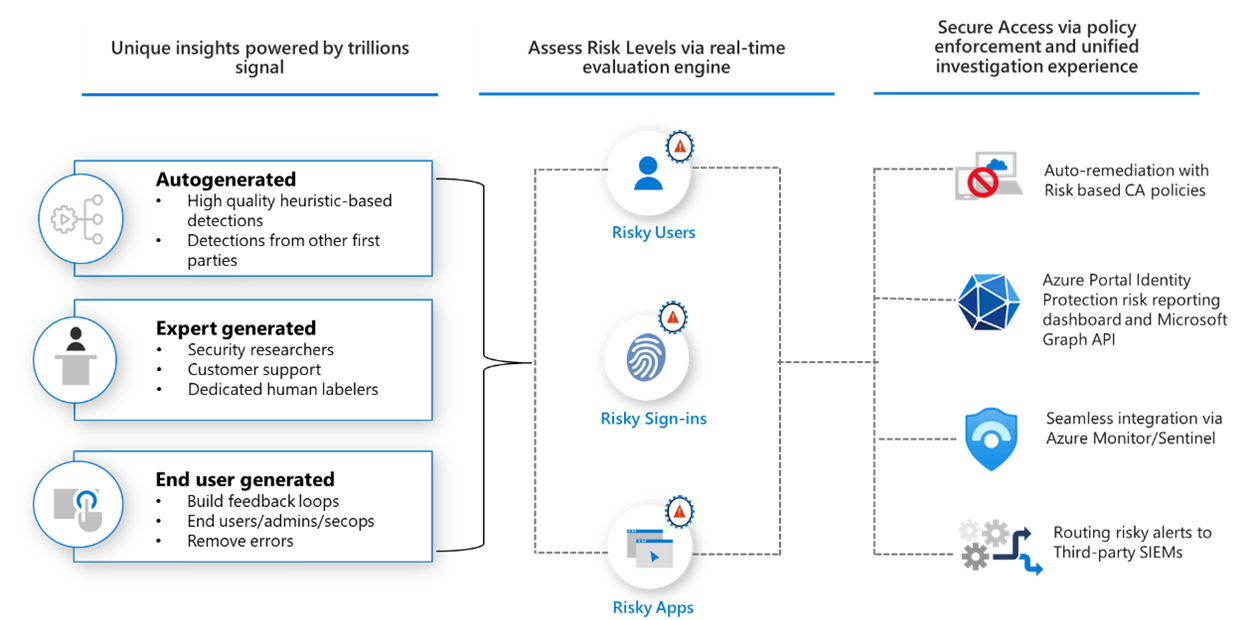
Securing identity at scale requires visibility into every authentication, device state, location pattern, and anomaly. Microsoft Entra achieves this using one of the most advanced security signal engines in the industry, processing trillions of signals every 24 hours. This continuous flow of global intelligence allows Entra to detect compromised identities long before they can cause real impact.
Signals are collected from across the Microsoft ecosystem, including Azure Entra, Microsoft 365, Defender for Cloud Apps, Windows, Azure infrastructure, and Microsoft’s global threat intelligence teams. When combined, these signals build a behavioral profile that helps Entra understand what normal activity looks like and when something deviates from it.
Entra evaluates these signals using three core categories of intelligence:
- Autogenerated detections Machine learning models that identify unusual sign in behavior, impossible travel, atypical device patterns, and suspicious session characteristics.
- Expert generated insights Detections created by Microsoft’s global threat research teams based on real attacks, investigation data, and signals shared across the Microsoft security ecosystem.
- End user and admin feedback Fraud reports, password reset events, compromised account flags, and governance actions that continuously refine detection accuracy.
These signals are analyzed in real time to produce a dynamic risk score for users, sign ins, and applications. This risk score is the core input for automated protection, Conditional Access decisions, and security monitoring workflows.
3. How Entra Detects and Evaluates Risk
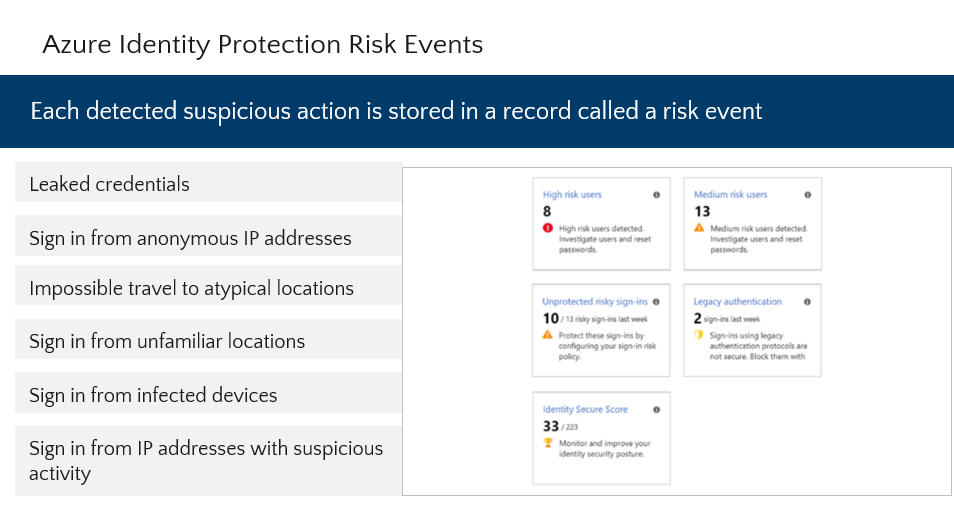
After signals are collected, Microsoft Entra transforms them into actionable insights through a unified risk evaluation engine. This engine does more than detect anomalies. It classifies risk, assigns severity, and determines whether a user, sign in attempt, or application should be trusted at a given moment.
Entra organizes identity risk into three core dimensions, each reflecting a different attack surface:
- User Risk Evaluates whether a user’s identity is likely compromised. Based on leaked credentials, malicious behavior patterns, unfamiliar activity, and signals from Microsoft’s global threat intelligence.
- Sign in Risk Assesses whether a specific authentication attempt is suspicious. Factors include impossible travel, known attacker IPs, device health, session anomalies, token behavior, and high risk locations.
- Application Risk Focuses on OAuth abuse, risky permissions, unusual consent requests, and unauthorized access to sensitive API scopes.
Each risk type receives a dynamic severity level, updated continuously as new signals arrive. This allows Microsoft Entra to block access, trigger MFA, require a secure password reset, or force remediation exactly when needed.
The principle behind this model is simple A user or session should never access sensitive resources unless their risk level is verified and trusted. This is the foundation of Zero Trust in identity security.
4. From Risk to Policy: Conditional Access
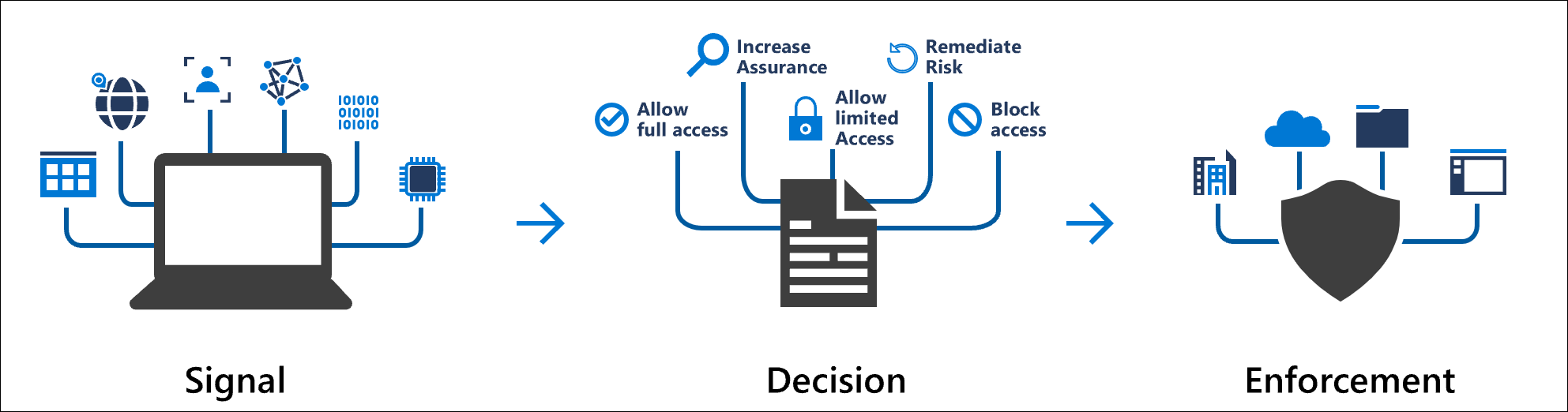
Once identity risk is identified, the system must be able to respond immediately. This is where Conditional Access becomes the central enforcement layer in Microsoft Entra. It turns risk signals into real time access decisions that protect the environment without interrupting legitimate users.
Conditional Access does not aim to block users by default. Its purpose is to allow access only when the right level of trust is established. This makes it the primary mechanism for enforcing Zero Trust principles across the organization.
Every Conditional Access policy is built from three core components:
- Signals User risk, sign in risk, device compliance, network location, session behavior, and application sensitivity.
- Conditions Who is accessing, from which device, under what circumstances, and at what risk level.
- Controls Allow, block, require MFA, enforce password reset, require a compliant device, or apply session restrictions.
The strength of Conditional Access comes from its ability to react instantly to changing risk. When Identity Protection detects a high risk sign in, policies can automatically block access, require MFA, or force secure remediation before the user reaches any cloud resource.
Microsoft recommends integrating risk based policies into every baseline deployment:
- Block high risk users until they complete remediation
- Require MFA for medium or high sign in risk to stop credential theft attacks
- Enforce compliant devices for sensitive applications
- Limit session access using Conditional Access App Control
Organizations that use Microsoft Defender for Endpoint can strengthen their Conditional Access posture by enforcing decisions based on the device risk level reported by MDE. Device risk reflects the real time security posture of the endpoint, including indicators of compromise, malware activity, tampering attempts, and configuration issues.
By combining identity risk and device risk in the same policy, access is granted only when both the user and the device meet the required trust level. This closes a critical gap in identity only enforcement and prevents compromised, infected, or non compliant devices from accessing sensitive applications even if valid credentials are used.
This integration creates a unified Zero Trust model where identity trust and endpoint health are evaluated together as part of every access decision.
Instead of relying on static rules, Conditional Access evaluates trust continuously. Even if credentials are stolen, attackers cannot continue without passing additional verification layers enforced automatically by policy.
5. Identity Governance and Lifecycle Control
Security is not only about preventing attacks. A secure environment must also control who receives access, how long they keep it, and under what conditions. This is why Identity Governance is a critical component of Microsoft Entra.
Without proper governance, permissions accumulate, privileged roles stay active for too long, and access drifts away from least privilege principles. In environments with contractors, partners, vendors, and distributed teams, governance is essential for preventing misuse and reducing unnecessary exposure.
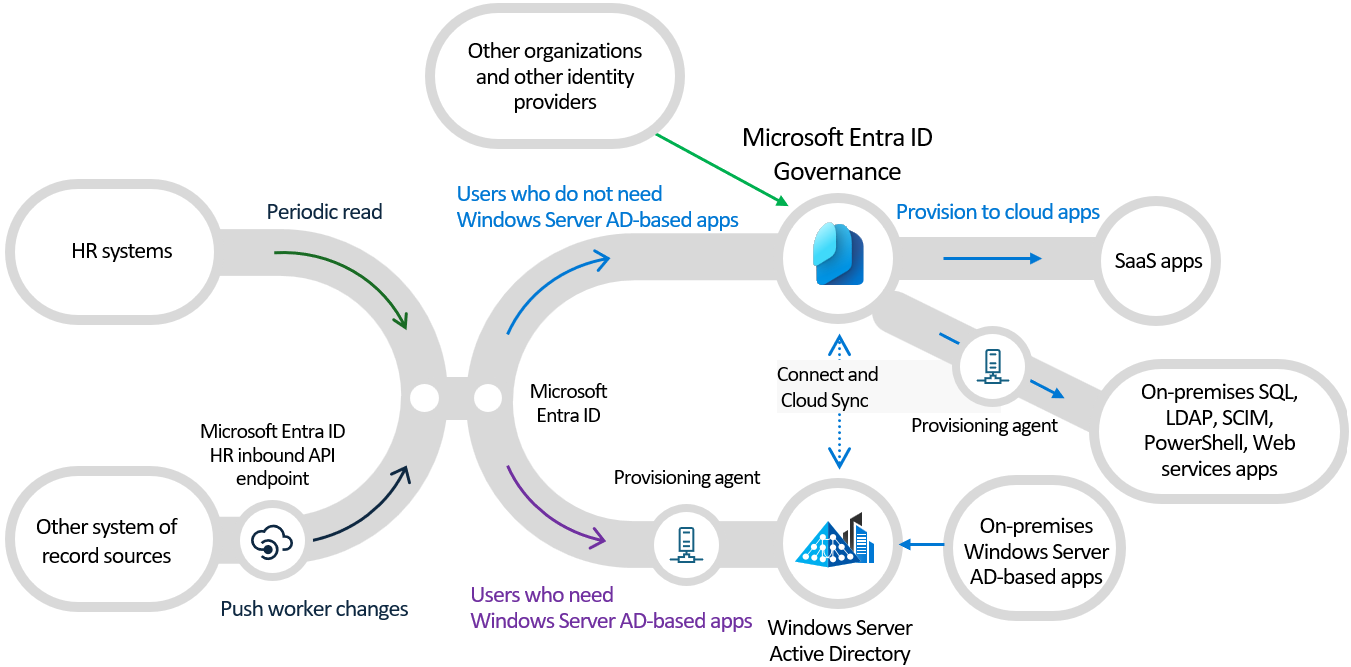
Microsoft Entra provides several governance capabilities that work together to manage identity lifecycle:
- Lifecycle Workflows Automate onboarding, offboarding, access adjustments, and approval processes for employees and guests.
- Entitlement Management Create access packages for teams or projects with built in approval, expiration, and recurring review cycles.
- Access Reviews Ensure that employees, partners, and guest users keep only the access they actually need. Reviews can be automated, repeated, and enforced with remove on deny.
- Privileged Identity Management (PIM) Replace permanent admin roles with Just In Time elevation. PIM adds approval, justification, MFA, time limits, and automatic role removal.
Together, these governance tools prevent privilege creep, improve compliance, and reduce the risk of unauthorized access resulting from outdated or forgotten permissions.
The central principle of governance is simple No one should keep privileged access by default unless there is a clear business reason. PIM enforces this automatically and provides full auditing for every role activation.
6. Integrate with Defender and Sentinel
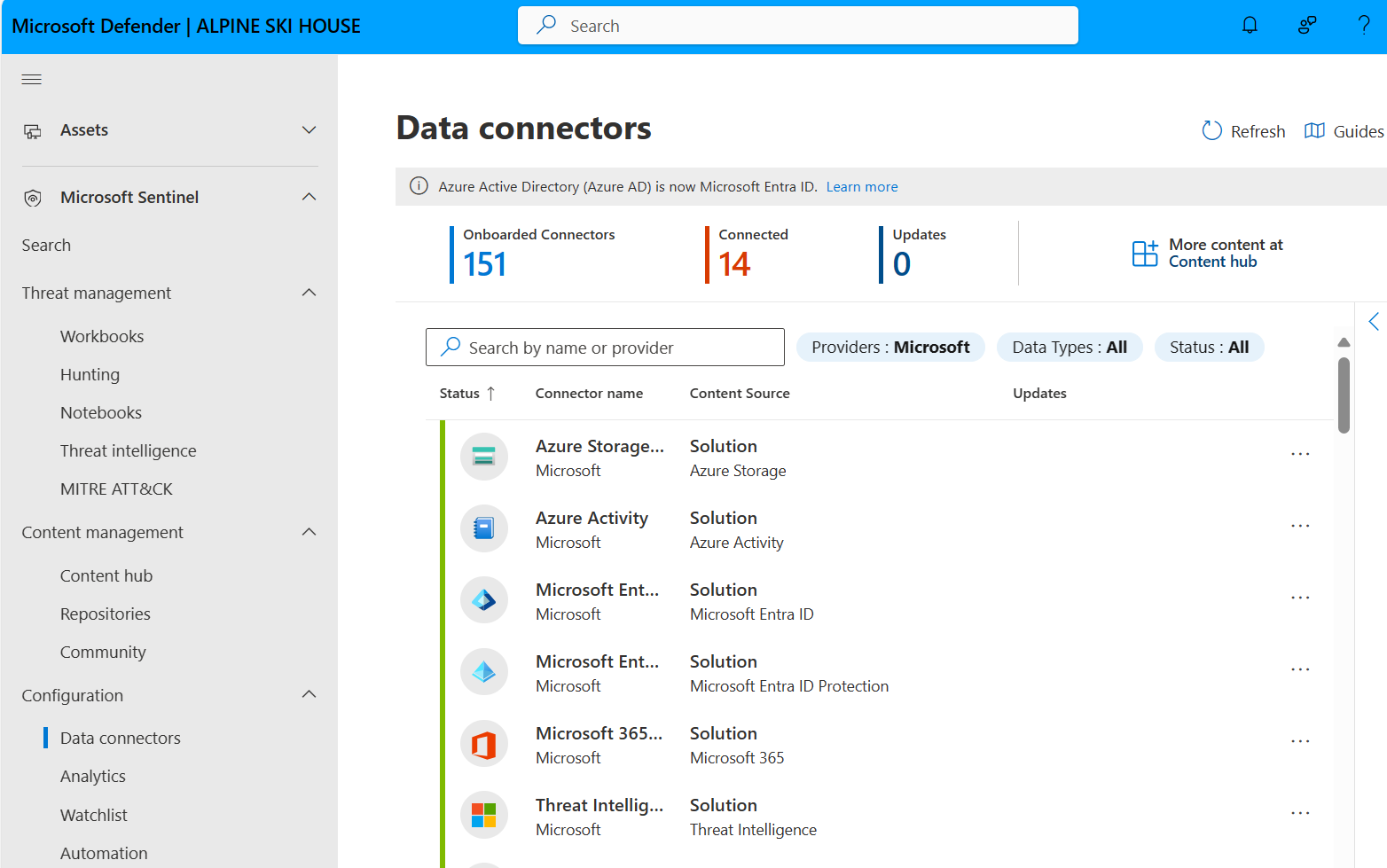
Identity signals are powerful on their own, but their true value emerges when they are combined with endpoint, cloud, email, and SaaS telemetry. Integrating Microsoft Entra with Microsoft Defender and Microsoft Sentinel creates a unified security ecosystem that provides full visibility and faster response.
Microsoft Entra logs and risk events can be streamed directly into Sentinel. This allows security teams to correlate risky sign ins with alerts from Defender for Endpoint, Defender for Cloud Apps, and Defender for Office 365. Instead of isolated alerts, analysts receive a correlated incident timeline that reflects the full attack chain.
Core integration points include:
- Sign in and audit logs Stream identity logs to Sentinel for querying, detection rules, and threat hunting queries.
- Identity Protection alerts Automatically correlate compromised identities with endpoint compromise, OAuth abuse, and suspicious cloud activity.
- Defender for Cloud Apps integration Apply real time session controls, detect risky cloud app activity, and block high risk behaviors instantly.
- Automation with Logic Apps Build playbooks that disable accounts, reset sessions, notify SecOps, or trigger governance workflows when specific identity risks are detected.
Sentinel adds detection and response on top of Entra’s identity intelligence. Instead of manually addressing every alert, automated playbooks can handle predictable identity events, letting analysts focus on high complexity investigations.
For more details on these integrations, start with:
7. The Complete Entra Security Blueprint
Building a secure Microsoft Entra environment requires more than isolated policies or individual tools. A strong identity architecture depends on a holistic blueprint that aligns identity protection, access control, governance, monitoring, and automation into a single integrated model.
A complete Entra Security Blueprint follows a layered approach. Each layer reinforces the next and ensures that identity is verified, governed, monitored, and protected across its entire lifecycle.
The blueprint consists of five core layers:
- 1. Identity Baseline Establish passwordless, MFA, strong authentication methods, and secure registration processes.
- 2. Risk Evaluation Continuously analyze user risk, sign in risk, and application risk through Entra’s global signal engine.
- 3. Conditional Access Enforcement Use Zero Trust policies to allow, block, require MFA, or apply session controls based on risk.
- 4. Identity Governance Implement Just In Time admin access with PIM, automate lifecycle workflows, enforce access reviews, and manage entitlement packages.
- 5. Security Monitoring and Automation Stream identity logs to Sentinel, integrate with Defender, build playbooks, and monitor risk trends for continuous improvement.
When these layers operate together, identity becomes a fully enforced security boundary rather than a simple authentication gateway. This blueprint reduces the attack surface, increases visibility, and ensures access is always tied to verified trust levels.
The diagram below illustrates how the identity layers connect into a single end to end security model:

With this design, organizations transition from reactive identity security to a predictable, automated, and resilient Zero Trust model.
8. Final Thoughts
Identity has become the most targeted and most critical component in modern cloud environments. As organizations scale, adopt SaaS services, integrate external partners, and distribute access across multiple business units, the identity layer becomes the true control plane of security.
A structured Entra Security Blueprint ensures that identity is not only authenticated, but also evaluated, governed, monitored, and protected at every stage. By combining risk evaluation, Conditional Access, identity governance, and continuous monitoring, Microsoft Entra delivers a full security ecosystem aligned with Zero Trust architecture.
Whether you are building a new cloud environment or strengthening an existing one, the steps remain consistent define your identity baseline, understand your risk signals, enforce dynamic access policies, govern permissions, and integrate identity telemetry into your security operations.
With the right identity blueprint, organizations gain visibility into who is accessing what, from where, and under which level of trust. This transforms identity from a static gatekeeper into a resilient security boundary that protects every workload in the cloud.
To explore these areas further, consider starting with:
This blueprint has already helped many organizations strengthen their identity posture and build a secure foundation for cloud adoption. I hope it helps you design an environment that is predictable, automated, and ready for Zero Trust.
Written by Captain Azure ☁️⚓