
Defender for Cloud Best Practices for Building a Secure Azure Architecture
When people think about cloud security, they usually imagine alerts, dashboards, and endless recommendations.
But the real story is much simpler – if you don’t understand your posture and you don’t have the right foundation, the environment becomes risky very fast.
In this guide we break down the key ideas behind Microsoft Defender for Cloud in a clear and practical way.
What CSPM really means, how CNAPP protects workloads, how visibility drives better decisions, and where AI and automation actually help you fix issues instead of just showing them.
The goal is simple – to understand how to turn Defender for Cloud into a real part of your Azure architecture, not another tool you check once in a while.
Table of Contents
- What is Microsoft Defender for Cloud
- What is CSPM
- What is CNAPP and Workload Protection
- Visibility and Risk Prioritization
- Copilot in Defender for Cloud
- Automation and Quick Fix
- GitHub and Shift Left Security
- Compliance and Continuous Improvement
- Defender for Cloud Best Practices
- Final Thoughts
What is Microsoft Defender for Cloud
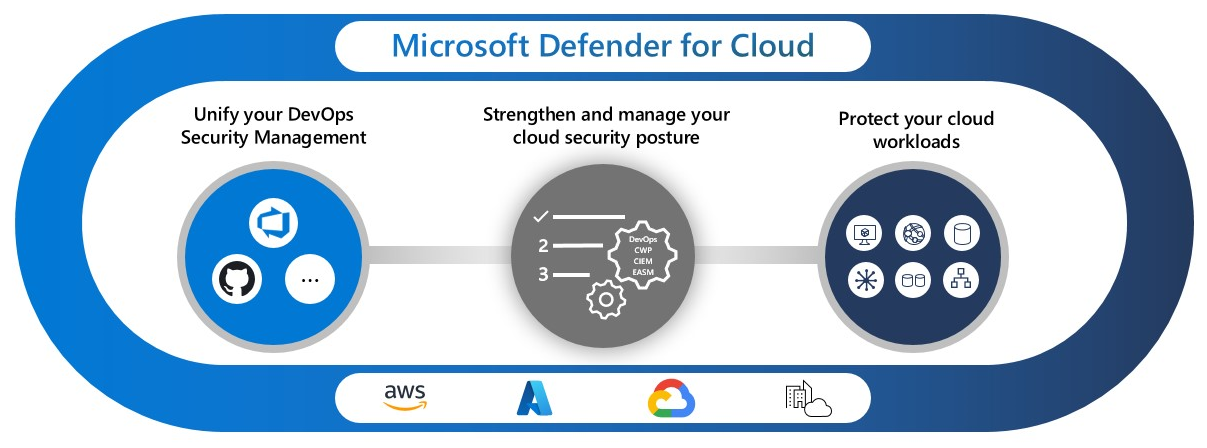
Microsoft Defender for Cloud is the security platform that sits across your entire Azure environment and helps you understand your posture, protect your workloads, and respond to real threats.
It brings visibility, recommendations, automation, and protection into one place so you can see exactly where the risks are and what you should fix first.
Defender for Cloud is not one feature. It is a combination of several layers that work together.
The first layer is CSPM which focuses on posture and configuration.
The second layer is workload protection which covers virtual machines, containers, databases, storage, and more.
Together they create a full view of your cloud security from architecture to runtime.
What is CSPM
CSPM is the posture layer of Defender for Cloud.
It gives you a clear view of how your Azure environment is built and where the real gaps are.
Instead of looking for problems manually, CSPM runs continuous checks on your resources and compares them to security standards and best practices.
The goal of CSPM is simple.
Show you what is misconfigured, explain why it matters, and help you fix it before it becomes a real security issue.
It covers identity, network exposure, storage settings, encryption, resource hygiene and many other areas that organizations often forget as they scale.
CSPM becomes even more effective when the environment follows a Landing Zone structure.
Clean boundaries and good governance make the findings more accurate and the remediation easier to manage across subscriptions.

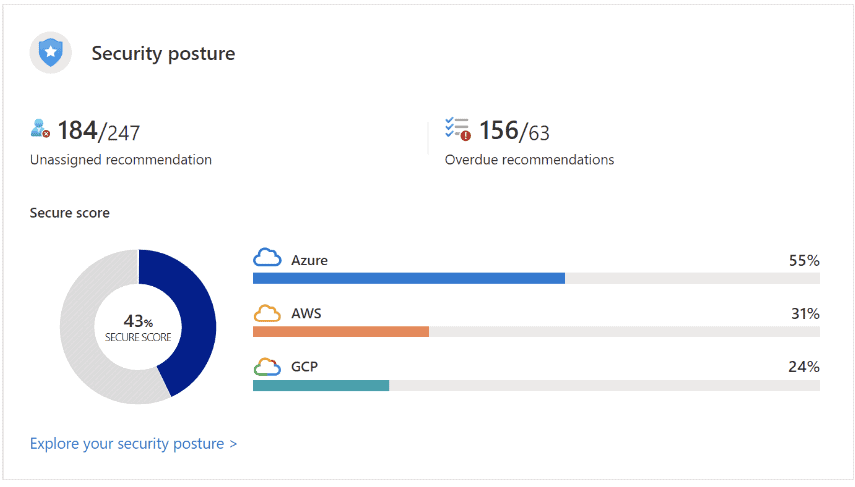
What is Security Posture
Security posture is the overall strength of your cloud environment against threats.
A simple way to understand it is to imagine a castle.
The castle has walls, a gate, guards and even a moat with crocodiles.
But if there are cracks in the wall or a small window left open an attacker will always look for that weak point instead of trying to break the front gate.
Cloud posture works the same way.
You can have strong identities, firewalls and monitoring, but a single misconfigured storage account or an overly permissive identity can create the entry point that leads to a full breach.
Why Zero Trust Is Required
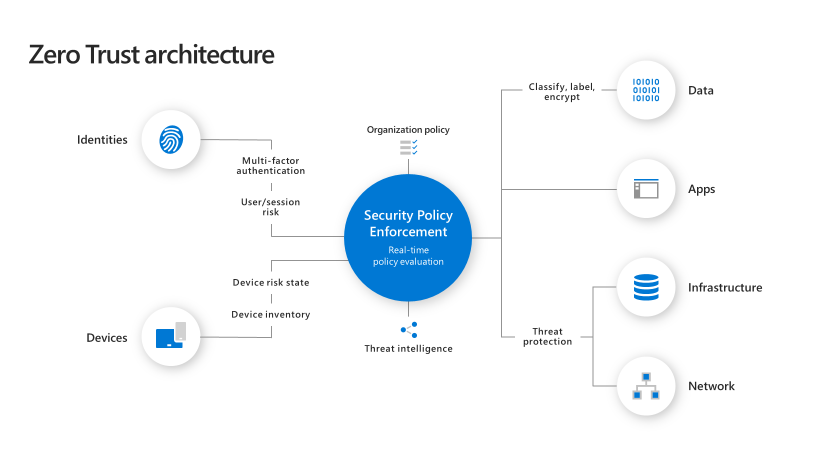
Zero Trust assumes that no resource, identity or network path can be trusted by default. This approach reduces the impact of posture gaps because every request must prove itself. Even if one control fails the attacker cannot simply move laterally without meeting more checks such as MFA, conditional access or network segmentation.
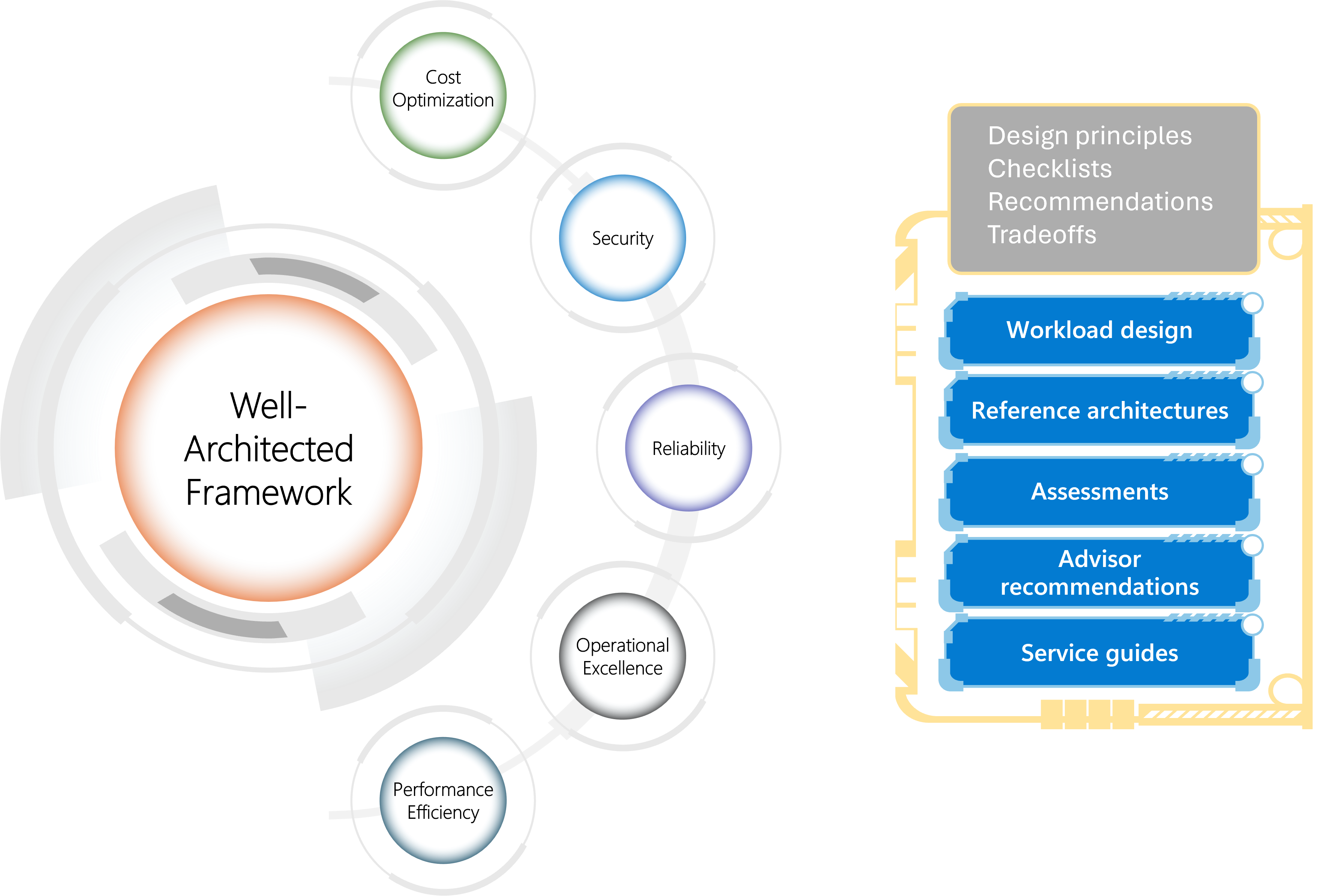
How the Well Architected Framework Helps
The Well Architected Framework provides the structure that keeps posture strong as environments grow. Identity, network, operations and reliability pillars directly influence posture. When these areas are designed properly misconfigurations become less common and easier to detect.
What is CNAPP and Workload Protection
CNAPP is the runtime protection layer of Defender for Cloud.
It builds on top of posture management and adds real time protection for the workloads that run in your cloud.
The second part is Cloud Workload Protection.
This focuses on real time protection for workloads wherever they run.
It can monitor virtual machines, containers, Kubernetes clusters, databases and even on prem servers.
CWP looks for active threats and vulnerabilities while the workload is running which is one of the most important trends in cloud security today.
Defender for Cloud acts like a security advisor that constantly watches the environment, finds weaknesses and suggests clear remediation steps you can apply immediately.
It connects with tools such as Sentinel, Logic Apps and ServiceNow so teams can automate response and reduce the time it takes to close security gaps.
When CWP and CSPM work together you get visibility from configuration to runtime.
This combined view helps you understand posture, detect threats and take action in one place.

Visibility and Risk Prioritization
Visibility is one of the strongest parts of Defender for Cloud.
When environments grow and new workloads are added it becomes very hard to understand what is actually happening across subscriptions and resource types.
Defender brings all of this into a single view so you can see posture, recommendations and real issues without switching between multiple tools.
One of the most helpful features is the ability to prioritize risk.
Instead of looking at a long list of findings Defender highlights the items that matter most.
Identity exposures, publicly reachable resources, missing encryption and vulnerable workloads always appear at the top since they represent real risk to the environment.
The platform also shows attack paths that help you understand how an attacker might move inside your environment.
This makes it much easier to fix the right issues first and avoid spending time on items that do not reduce risk.

Copilot in Defender for Cloud
Copilot adds an intelligent layer on top of Defender for Cloud.
Instead of looking at a recommendation and trying to understand why it matters Copilot explains the issue in clear language and shows the impact it has on your environment.
This helps teams understand the risk faster and make better decisions.
Copilot also supports guided remediation.
It can generate the exact steps needed to fix an issue and can even create scripts or policy definitions when relevant.
This is very useful for DevOps and engineering teams that want to fix security issues without searching through documentation.
Another strong capability is context.
Copilot looks at your environment and gives additional insights that do not appear in the original recommendation.
For example it can highlight related resources, identity exposures or network paths that increase the risk.
The experience becomes even stronger when combined with automation since Copilot can help explain the problem and the automation can apply the fix across multiple resources.

Automation and Quick Fix
Automation is one of the most effective ways to improve security at scale.
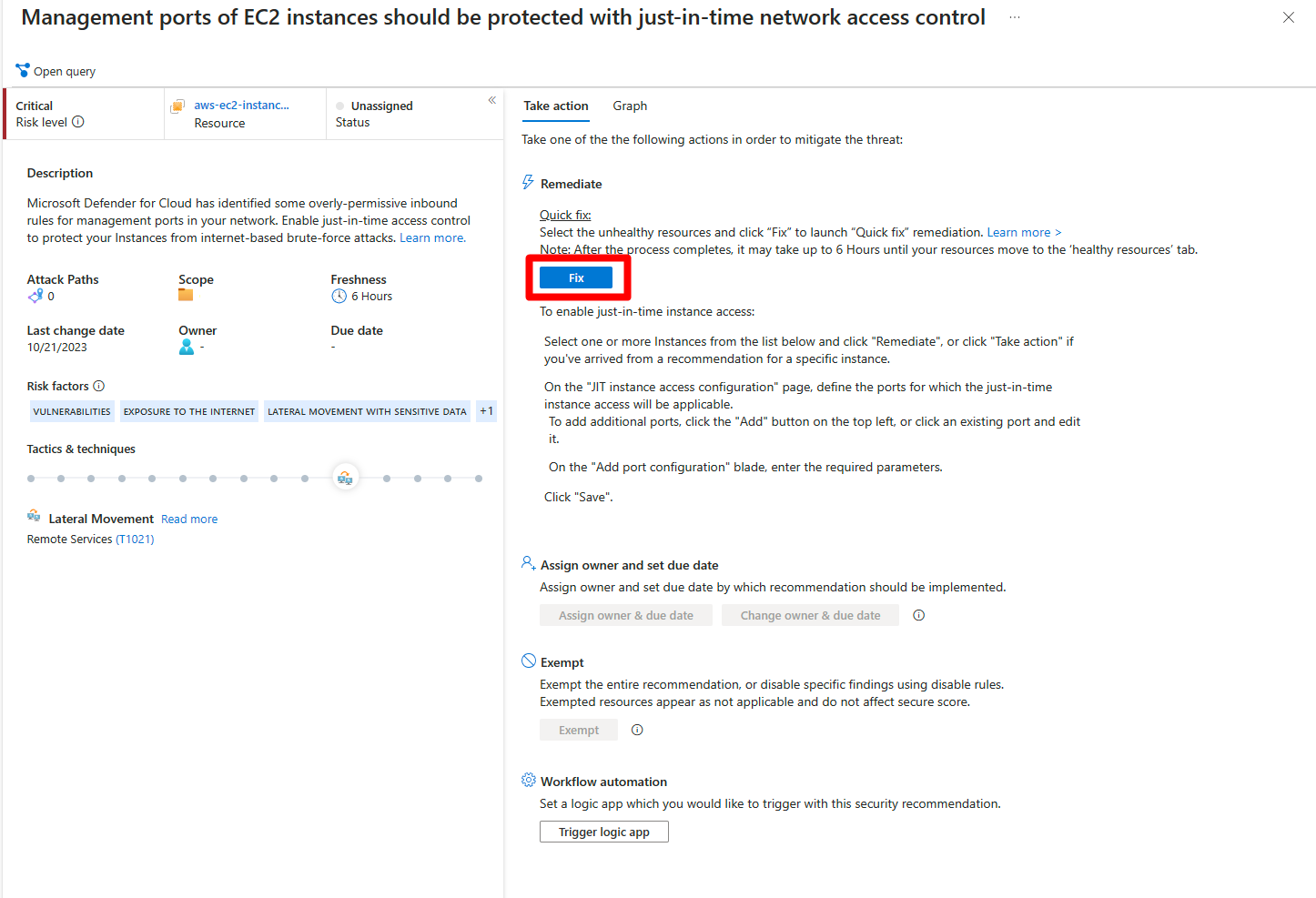
Defender for Cloud includes Quick Fix options that let you apply a remediation directly from the portal.
This is very helpful when you want to fix a specific issue fast without writing scripts or logging into multiple resources.
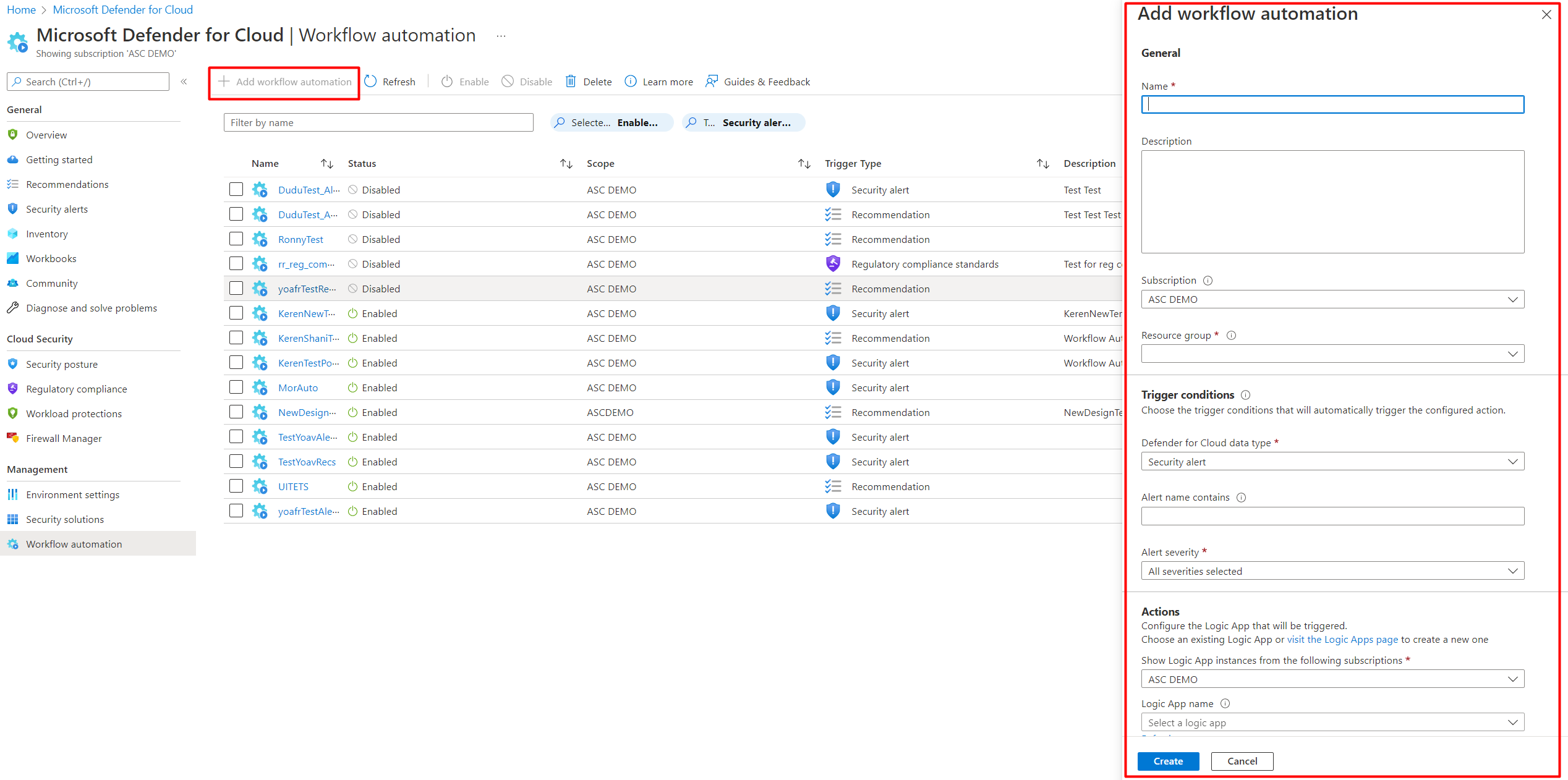
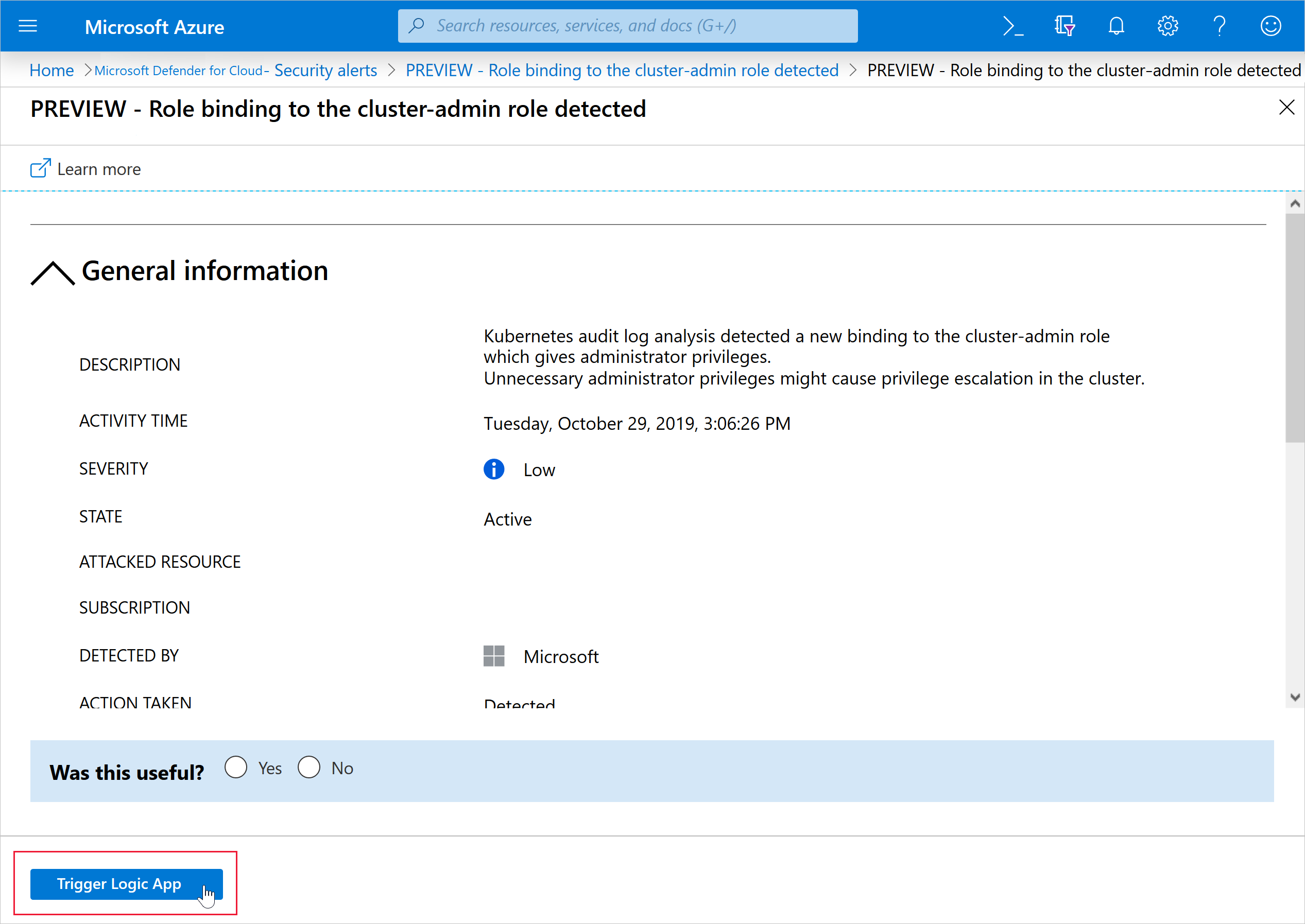
For issues that repeat often teams can use workflow automation.
This allows you to trigger actions automatically whenever a recommendation appears.
The action can be a Logic App workflow a script or even an integration with a ticketing system.
Automation helps reduce human error and makes the environment more consistent.
It also saves time for teams that manage many subscriptions and resources.
Quick Fix and automation become very powerful when combined with Copilot.
Copilot explains the issue and automation applies the remediation.
This creates a clean and predictable flow for handling posture and security findings.
GitHub and Shift Left Security
Security starts long before a resource is deployed to Azure.
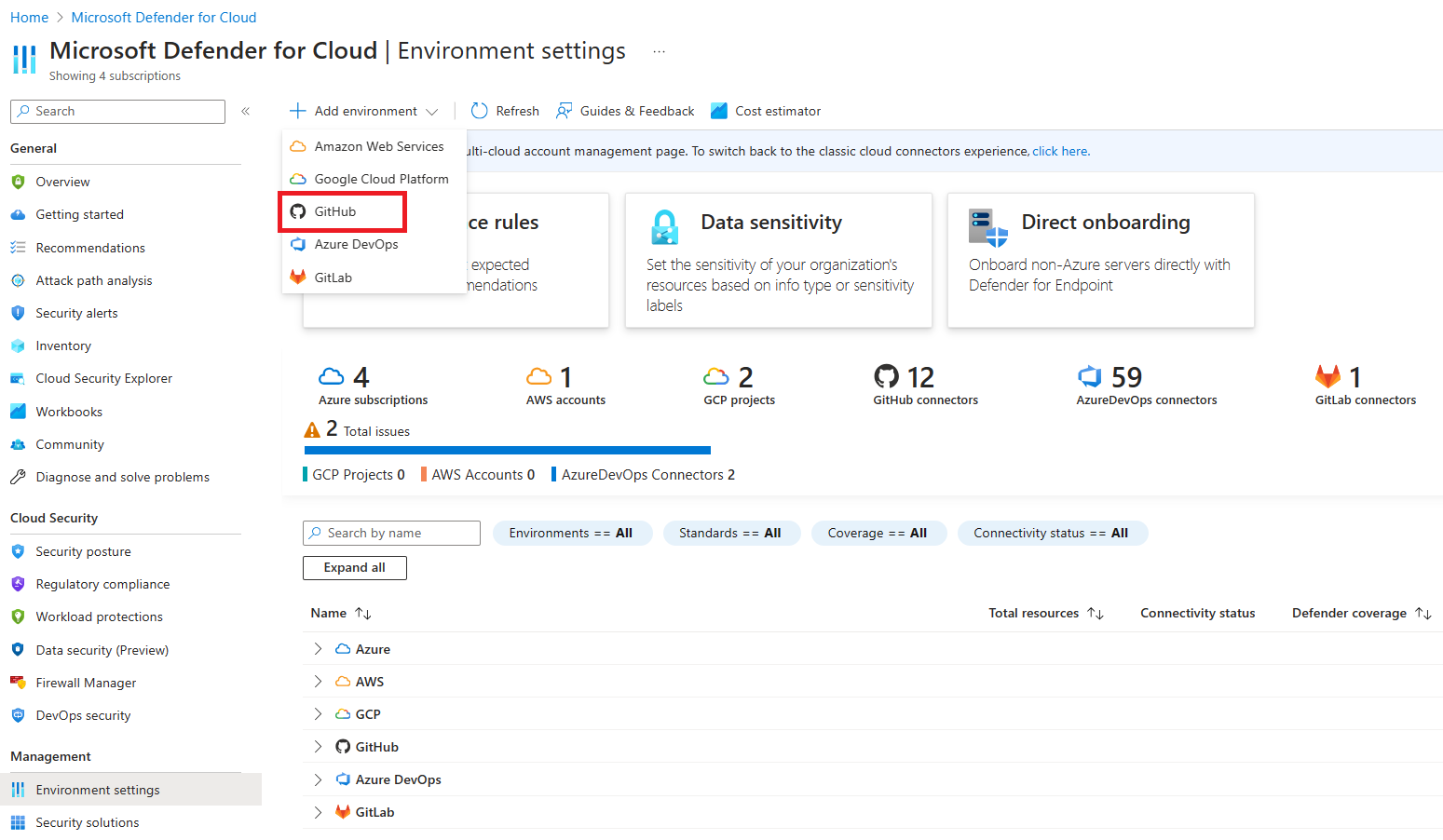
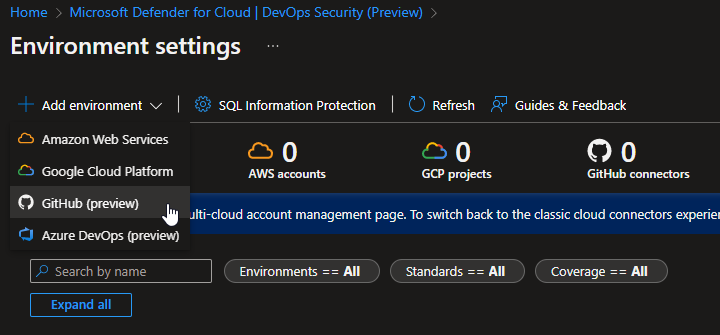
By connecting GitHub to Defender for Cloud you can detect issues directly in the code and catch problems early.
This includes secret scanning code scanning and dependency checks that help prevent security issues before they reach production.
Shift Left means moving security closer to the development process.
Instead of waiting for Defender to alert on a running workload GitHub can highlight misconfigurations and vulnerabilities the moment they are introduced.
This reduces the amount of fixes needed later and helps keep posture strong across the entire environment.
The integration also allows teams to create pull request checks.
These checks block unsafe changes and make sure every deployment follows the required security standards.
This creates a clean and predictable workflow for both developers and security engineers.
When GitHub and Defender work together the environment becomes easier to secure.
Developers get clear feedback and security teams get better visibility without slowing down the development process.
In a full DevSecOps flow security is present in every stage.
Code is scanned inside the IDE and the repository, infrastructure as code files are validated before deployment, identities and secrets are handled through managed identities and secure stores, and the CI and CD pipelines enforce policy before anything reaches Azure.
This turns security from a late stage review into a built in part of how applications are developed and delivered.
Compliance and Continuous Improvement
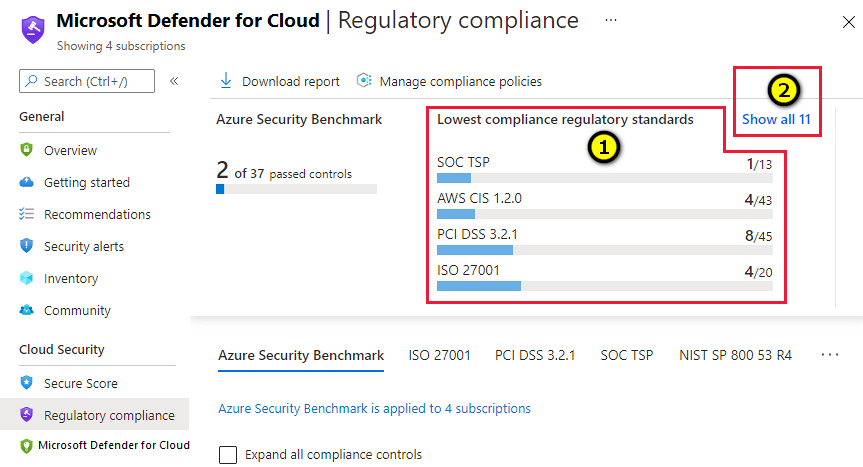
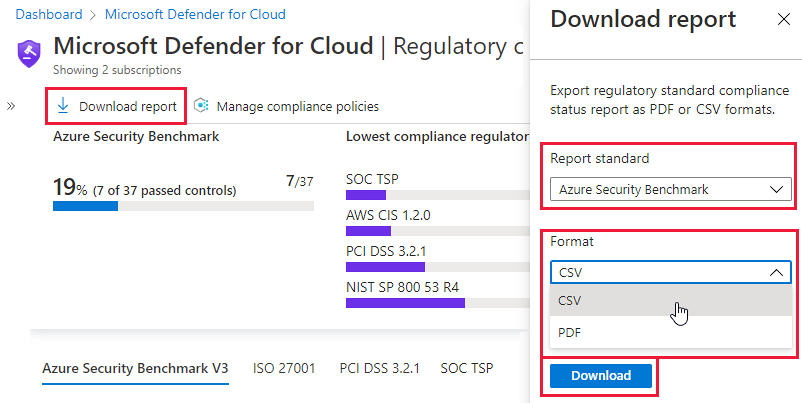
The compliance dashboard in Defender for Cloud helps you measure how well your environment aligns with industry standards and security frameworks.
It gives you a clear score shows the gaps and highlights the controls that need improvement.
This is useful for both internal reviews and external assessments.
Compliance is not a one time task.
As the environment grows and new resources are added settings change and new risks appear.
Reviewing compliance on a regular basis helps teams stay ahead and avoid large fixes later.
Defender for Cloud also supports multiple standards such as Azure Security Benchmark NIST and CIS.
This allows organizations to choose the framework that fits their needs and track progress over time.
The key is to focus on continuous improvement.
Making small and consistent changes always creates a stronger security posture than trying to fix everything at once.
Defender for Cloud Best Practices
These best practices help teams get real value from Defender for Cloud. They focus on simple steps that reduce risk improve visibility and make daily operations easier.
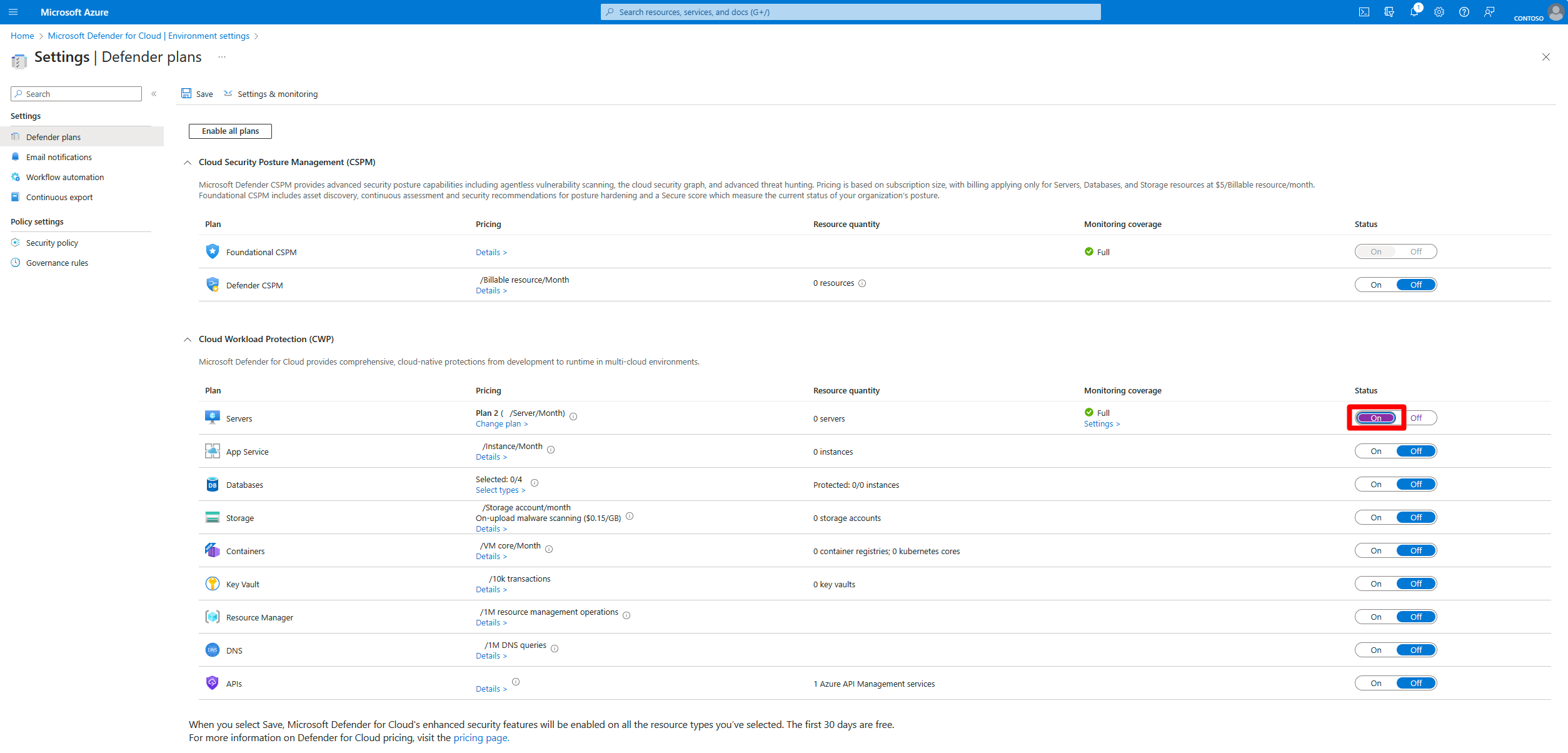
1. Enable Defender plans at the subscription or management group level
Turning on protection in a single resource group is not enough. Enable the plans at the subscription or management group level to ensure full coverage and consistent security across the entire environment.
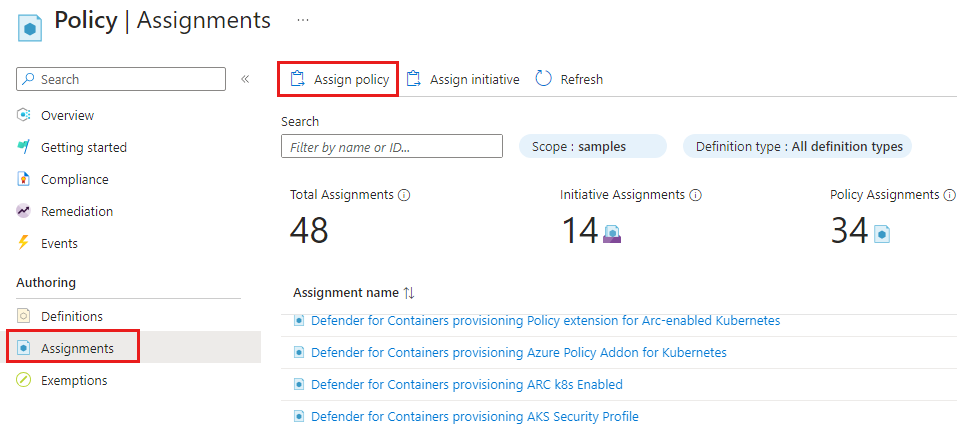
2. Use Azure Policy for continuous enforcement
Defender for Cloud works best when Azure Policy handles enforcement. Policies make sure that new resources follow the same security rules and help detect drift before it creates real issues.
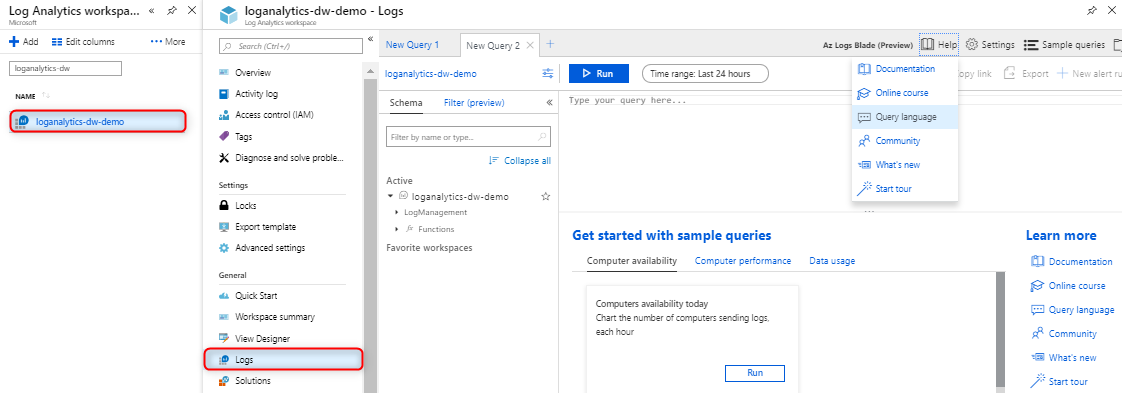
3. Connect all workloads to Log Analytics
Logs are the foundation of cloud security. Make sure virtual machines containers storage and other workloads send their data to Log Analytics. This allows Defender to detect threats and highlight the most important actions.
4. Focus on high impact recommendations first
Not every recommendation has the same priority. Start with identity exposure public network access missing encryption and vulnerable workloads. These items reduce risk faster and create a stronger foundation.

5. Automate fixes for repeating issues
If the same issues keep coming back use workflow automation or Quick Fix. This saves time reduces manual work and helps maintain a stable security posture across many subscriptions.
6. Use Copilot for insights and guided remediation
Copilot explains why issues matter and how to fix them. It helps DevOps and engineering teams understand security findings quickly and apply the right changes.

7. Integrate GitHub or Azure DevOps for shift left security
Connecting your repositories allows you to catch problems in code before they reach production. This strengthens posture and reduces late stage fixes.
8. Treat compliance as an ongoing process
Review compliance regularly and track improvements over time. Small consistent progress builds a stronger and more predictable environment.
Final Thoughts
Defender for Cloud becomes powerful when it is part of the architecture and not an isolated tool.
When posture workload protection automation and development practices work together the environment becomes easier to manage and safer at every stage.
Start with a clean foundation follow the best practices and use the insights from Defender to guide continuous improvement.
Small changes made consistently have a bigger impact than large fixes done late.
Security is not about reacting to alerts.
It is about building a platform that can grow without adding unnecessary risk.
Defender for Cloud gives you the visibility the protection and the automation to make that possible.
✨ Credits
Built and documented by 🚀 Captain Azure — Ofek Ben Eliezer
🎥 Video: From Risk to Response: Microsoft Defender for Cloud (Hebrew)